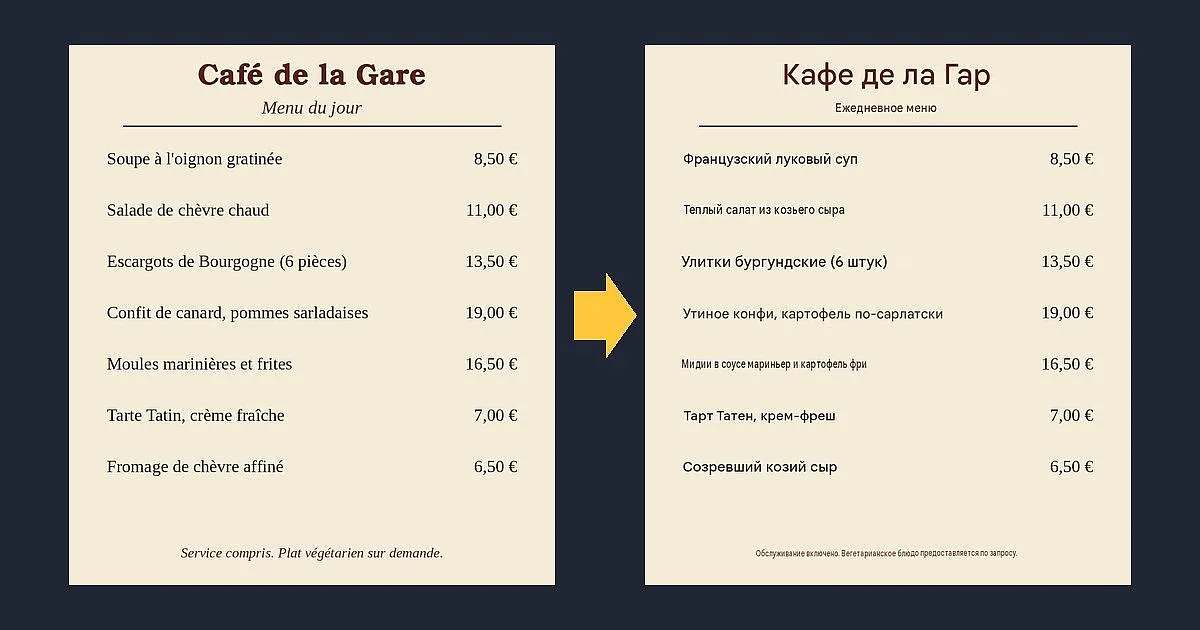
In short. We made four test pictures with text in French and German (a cafe menu, a construction-site sign, a kettle manual in small print, and a note in a handwriting-style font) and on 26 October 2026 ran them through the web versions of two free translators: Google Translate and Yandex Translate. Neither required signing in. Both found the text on their own, translated it into Russian and returned the picture with the translation in place of the original. Neither is flawless, and their mistakes differ. Below: what exactly worked, where the translation went wrong, and what follows from it.
How this article differs from its neighbors. This one is about translating text that already sits in a picture. For an overview of translators for texts and documents, see AI translators: what is in the catalog. Pulling text out of a scan or a PDF without translating it is a separate task that we do not cover here.
How we tested
We made the pictures ourselves and put in text we knew exactly, so there was something to compare with. What we submitted:
- A French cafe menu: a title, a subtitle, seven dishes with prices in euros, a line at the bottom. The dish names have traps: "chèvre chaud" (warm goat cheese), "pommes sarladaises" (here "pommes" means potatoes, not apples), "moules marinières".
- A German construction-site sign: a large "ACHTUNG", a no-entry line, a line about parents, opening hours. White text on blue.
- A German kettle manual: six steps and a warranty line, small type (15 px on a 900 by 700 image).
- A French note in an italic script font that looks like handwriting.
An important caveat: these are not phone photos. They have no tilt, glare or blur, so on real shots results may be worse. The note is set in a calligraphic font, not written by hand, so we did not test real handwriting. The target language was Russian in every run.
Google Translate
In the web version you open the "Images" tab and upload a file (jpg, jpeg, png, webp); the language is detected automatically. A few seconds later the picture shows Russian text instead of the original. The background, colors, line layout and prices are preserved. At the top there is a "Show original" switch and "Copy text" and "Download translation" buttons.
- Menu: all seven dishes, the headings and the bottom line were translated, prices stayed in place. Both traps were handled correctly: "chèvre chaud" became a warm goat cheese salad and "pommes sarladaises" became potatoes Sarlat style. The cafe name was not translated but transliterated into Russian letters.
- Sign: all four lines present. But "ACHTUNG" became "DANGER" (the German word is closer to "Attention", a weaker word) and "Geöffnet" ("open") became "Working hours". The meaning survived, the tone did not.
- Small-print manual: every step was read and translated. One meaning error: in step 3 "Den Schalter nach unten drücken" ("press the switch down") became "press and hold the switch". That is a different instruction. Letter sizes in the translated text jump around: some lines came out visibly smaller than others.
- Note: read in full and translated correctly ("Dear Marie, thank you for the delicious cake! See you Saturday at the station at eight o'clock."), but the sentence was split across lines differently from the original.
Google's help page warns that small, unclear or stylized text is translated with errors. Our test confirms it on one example: the meaning error turned up exactly in the small text.
Yandex Translate
The web version has a separate photo translation page (translate.yandex.ru/ocr): drag a file in or choose it manually, with a 5 MB limit. The source language defaults to English, so for our pictures we set it ourselves (French or German). The result is also shown over the picture with the background kept, there is an "Original" tab and "Download" and "Open as text" buttons.
- Menu: the translation is readable, and the name "Café de la Gare" was translated by meaning ("Cafe at the station"). But both traps failed: "chèvre chaud" became "hot salad of goat meat" (meat instead of cheese) and "pommes sarladaises" became "apples Sarlat style". For someone with an allergy or who does not eat meat, that matters. Another oddity: in some prices "€" was replaced by the word "euro" in a different font, in others the sign stayed, which looks sloppy.
- Sign: "Attention", "Open: Mon-Fri 7:00-17:00", the no-entry line and the parents line were translated more accurately than in Google. A small artifact from the erased letter remained next to "Attention".
- Small-print manual: all six steps are correct, including step 3 ("press the switch down"). The word "Electric" was added to the title although the original does not have it, and "MAX" was expanded to "MAXIMUM mark", which is fine in meaning.
- Note: "Dear Maria, thank you for the delicious cake! See you on Saturday at the station at eight o'clock." Correct, and the lines are split as in the original.
Which to pick, from our observations
- Menus and dish names: Google handled both ambiguous dishes, Yandex got both wrong. If a menu has allergens, meat or unfamiliar names, a translation alone is not enough in any case (see below).
- Manuals and small print: on our example Yandex kept the meaning, Google distorted one step.
- Signs: both understood the meaning, Yandex chose words more accurately.
- You need the text as text, not a picture: both have it: "Copy text" (Google) and "Open as text" (Yandex).
We never got an empty result: both services read all four pictures. The difference is in translation mistakes, not in recognition.
Limits: where translation goes wrong
- Meaning errors in "safe" places. Google changed "press" to "press and hold", Yandex turned potatoes into apples and cheese into meat. The translation sounds confident, and you can only spot a swap if you know the original.
- Numbers, doses, allergens, legal terms. Medicine names, doses, ingredients, amounts, dates and contract terms should be checked against the original or with someone who knows the language. Prices and hours were conveyed correctly in our test, but that is no reason to rely on a translation where a mistake is costly.
- Small and stylized fonts. Google's help page says so outright. In our test the small print was read by both, but that is exactly where Google got a meaning wrong.
- Handwriting. We did not test real handwriting: the note was set in a font, and both services read it without errors. Do not carry this result over to live handwriting.
- Recognition comes first, translation second. A recognition error spoils the translation. If a translation looks odd, show the original (a switch in Google, the "Original" tab in Yandex) and compare.
- Wordplay and slang. Memes, jokes and set phrases are often translated word for word; we did not test that.
Privacy: what to do with documents
When you upload a picture to an online service, the file goes to the developer's server. For a menu or a sign that does not matter. But passports, contracts, medical papers, bank statements, correspondence and other people's documents should not simply be uploaded anywhere.
- Before uploading, cover or crop everything extra: numbers, addresses, faces, QR codes.
- For truly important documents (visa, medical, legal) you need a certified translation from a specialist: an app is good for understanding the meaning, not for signing.
What this article does not cover
We tested only what opens in a browser without registration. Mobile apps and live camera translation, chatbots, and services where photo translation is available only after signing in were left out. For example, on the Papago site the "Image" tab asks you to log in, so we did not evaluate it.
The test was run on 26 October 2026, one run per picture. We keep the screenshots of the results. If a service changes, we will update the article and say so in our Telegram channel Pro AI Expertise (the channel is in Russian).